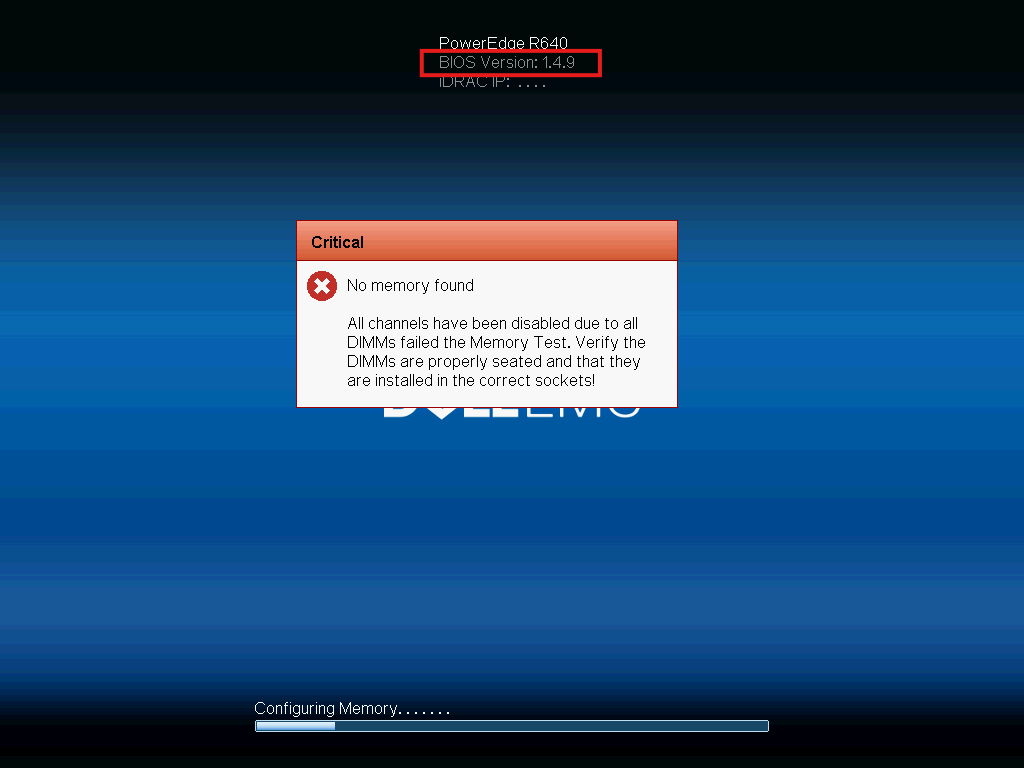
If you upgrade your 14 gen DELL server to an Intel Xeon Scalable 2nd Gen CPU, you may receive this error.
Common second gen CPUs:
- Xeon Gold 5218 (16 cores)
- Xeon Gold 5220 (18 cores)
- Xeon Gold 6240 (18 cores)
- Xeon Gold 6252 (24 cores)
- Xeon Platinum 8253 (16 cores)
- Xeon Platinum 8276 (28 cores)
Chances are your BIOS is outdated and doesn’t support second gen processors. DELL did not introduce support for these processors until BIOS version 2.2.10. If you have a version below that you will receive this error without a doubt.
What you’ll have to do is install a first GEN CPU, update the BIOS, and then reinstall the second GEN processors.
Examples of first gen processors you can use:
- Xeon Bronze 3104
- Xeon Bronze 3106
- Xeon Silver 4108
- Xeon Gold 6126
- Xeon Gold 6148 (20 cores)
- Xeon Platinum 8176 (28 cores)
Quick way to identify the generation
- 31xx, 41xx, 51xx, 61xx, 81xx → 1st Generation (Skylake)
- 32xx, 42xx, 52xx, 62xx, 82xx → 2nd Generation (Cascade Lake)
Just update the BIOS and you’ll be good to go.
Leave a Reply