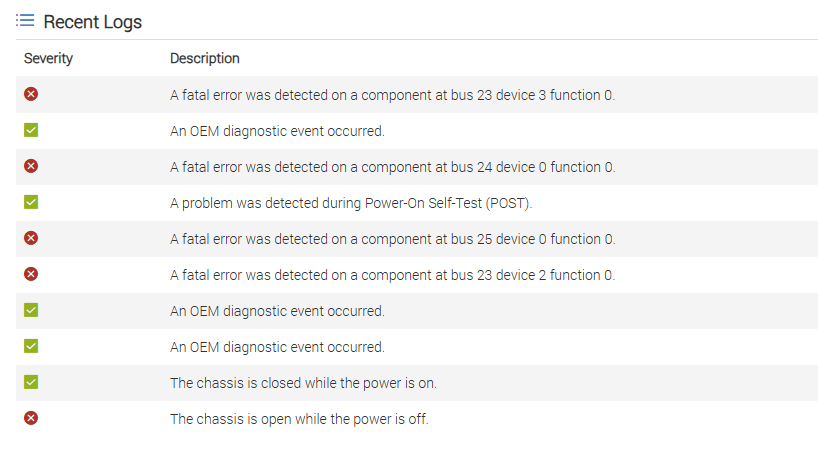
One of my R640s presented a PCIe error with the following iDRAC log.
A fatal error was detected on a component at bus 25 device 0 function 0.
At boot time I received a generic PCIe error message prompting me to dig deeper into the logs. Going into the BIOS and looking at the devices it was immediately apparent what the problem was.
The server was not seeing my NDC.
Replacing the NDC resolved the issue. However, if you’re unable to determine the problematic device you can also do the following.
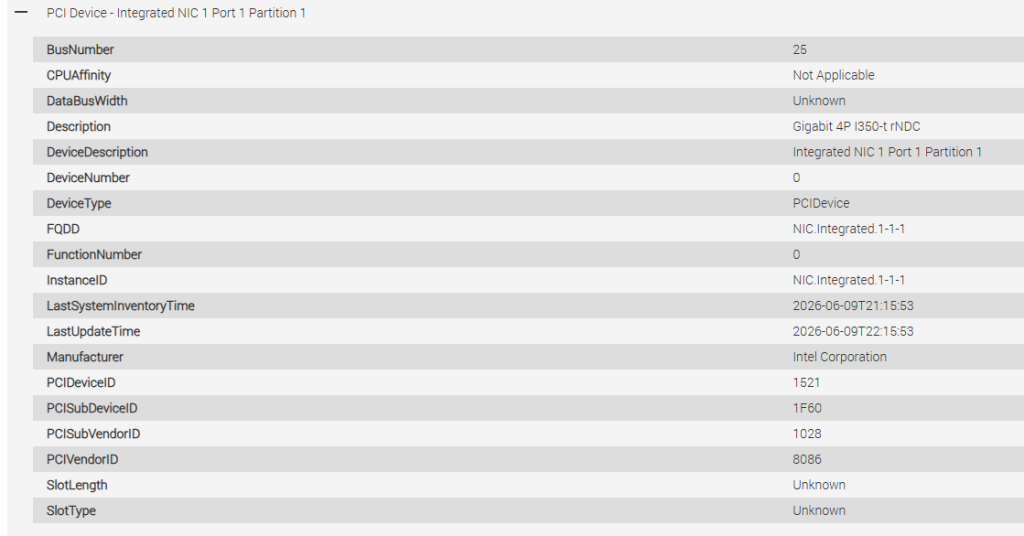
In iDRAC, navigate to system—>Inventory—>hardware inventory.
Here you will see hardware info related to devices and their associated bus numbers. Finding the bus number referenced in the error will tell you which device is causing the problem.
Here you can see bus number 25 is associated with the NDC:
Sometimes it’s not this easy though. If you can’t locate the bus number the best troubleshooting step is simply removing PCIe devices one by one until the error goes away. Reseat the component and replace it if the problem remains.
Leave a Reply