
I have a Mikrotik hAP x S router configured with mostly default settings. I noticed wifi was running extremely slow on the default network. I first tested the network while plugged straight into the router and saw more or less what I expected – a 500Mbps download speed from my carrier.
Testing the wifi connection was a different story. I was only achieving a maximum download speed of 3Mbps.
I ran the following at my Debian terminal:
06:43 PM-adam@adampc:~$ iw dev wlp3s0 link
Connected to d0:ea:11:13:af:b7 (on wlp3s0)
SSID: MikroTik-13AFB7
freq: 2462
RX: 16009177 bytes (20247 packets)
TX: 32704312 bytes (30902 packets)
signal: -41 dBm
rx bitrate: 6.0 MBit/s
tx bitrate: 300.0 MBit/s MCS 15 40MHz short GI
bss flags: short-preamble short-slot-time
dtim period: 1
beacon int: 100
This revealed a healthy TX rate but an absolutely abhorrent RX rate.
After a lot of troubleshooting I discovered both the 2.4 and 5Ghz bands were sharing the same SSID.
The immediate solution is to simply put the 2 bands on different SSIDs.
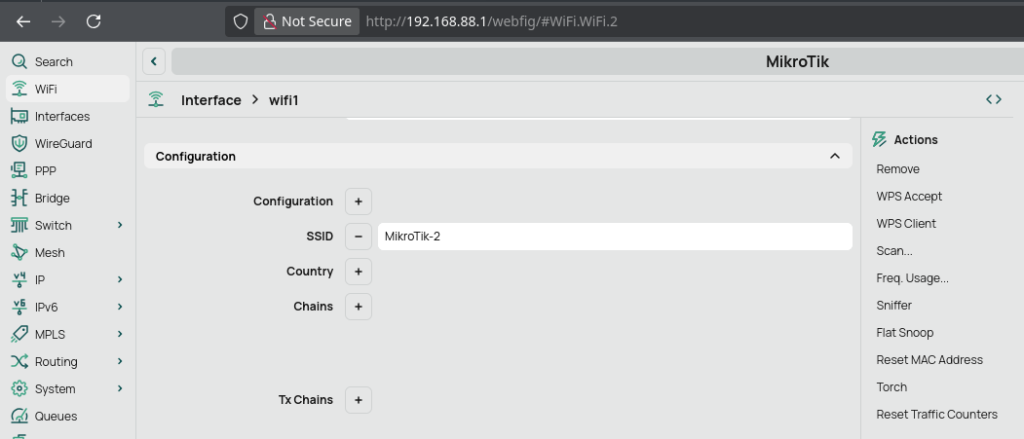
Why this fixes the problem:
When both the 2.4 GHz and 5 GHz radios share the same SSID, your laptop (and most Wi-Fi clients on Linux in particular) has to decide which band to attach to using its own internal logic. That decision is not always optimal.
In my case, the ThinkPad T480 consistently chose the 2.4 GHz network, even though a faster 5 GHz network was available. This is a common behavior because:
- The 2.4 GHz signal often appears “stronger” or more stable at first scan
- Linux Wi-Fi clients tend to be “sticky” and do not aggressively roam to better bands
- The access point’s band steering (if present) is not strong enough to override the client decision
Once connected to 2.4 GHz, performance was severely limited due to:
- Heavy local congestion from neighboring networks
- Narrow channel bandwidth
- Legacy Wi-Fi rate fallback behavior
This resulted in the Wi-Fi link negotiating a 6 Mbps receive rate, even though signal strength was excellent. That single factor explains the observed ~2–3 Mbps real-world throughput.
The key insight
The issue was not raw signal strength or ISP bandwidth. It was that:
The device was correctly connected, but on the wrong frequency band.
Because 2.4 GHz is shared, crowded, and prone to legacy rate fallback, even a “good signal” connection can perform extremely poorly.
Why separating SSIDs works
By splitting the network into:
MikroTik-2GMikroTik-5G
you remove ambiguity. The client is now forced to make an explicit choice rather than an automatic one.
This has several effects:
- The 5 GHz network becomes directly selectable and predictable
- The client stops defaulting to 2.4 GHz “by accident”
- Roaming behavior becomes deterministic instead of heuristic
- The high-speed band is consistently used for throughput-heavy traffic
Final outcome
After separating the SSIDs and connecting directly to the 5 GHz network, performance immediately returned to expected levels, with significantly higher link rates and throughput aligned with the ISP connection.
The fix confirmed that the issue was not hardware, drivers, or ISP limitations — but simply band selection behavior combined with shared SSIDs and suboptimal Wi-Fi steering.
Leave a Reply