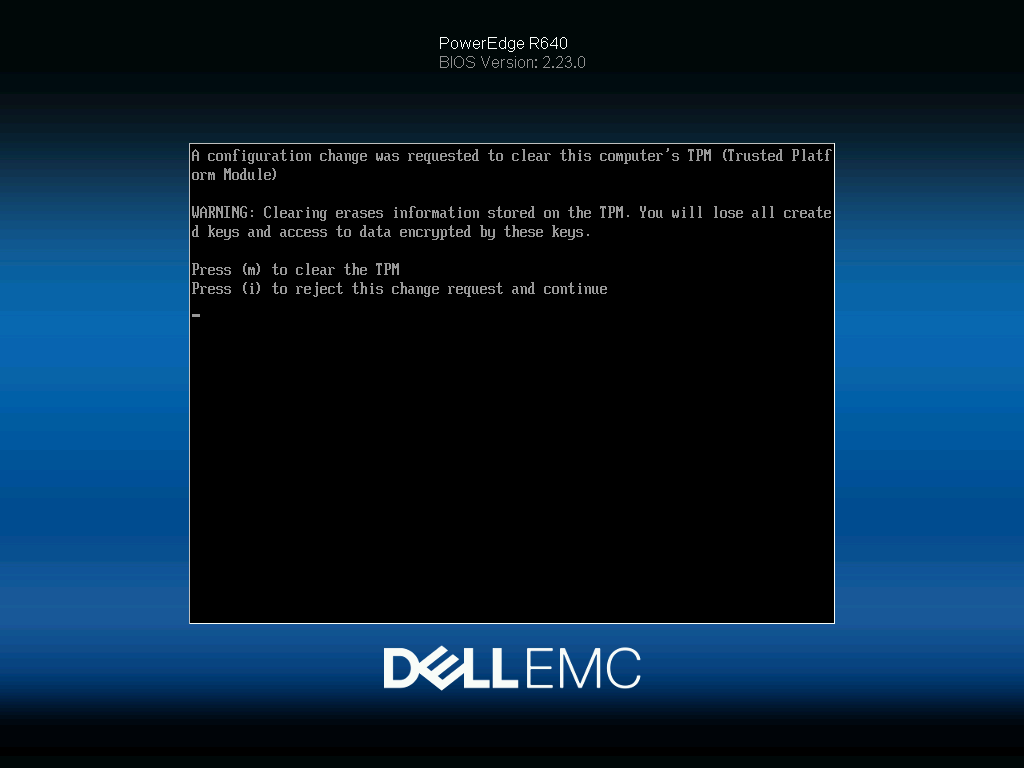
The TPM chip in your server typically contains encryption/security related data.. If a request to clear the chip was made you will see the following error.
“A configuration change was requested to clear this computers TPM (Trusted Platform Module.)
It then warns you that clearing the TPM will erase all encryption keys stored on the chip.
You can choose to clear the TPM or reject the change. Your choice depends entirely on your setup.
Before clearing the TPM, determine whether the server uses:
- BitLocker (if running Windows)
- LUKS or other disk encryption (if running Linux)
- Virtualization security features that store secrets in the TPM
If the server is not using TPM-backed encryption or security keys, selecting Yes to clear the TPM is generally safe.
If the server is using BitLocker or other TPM-based encryption, make sure you have the recovery keys before clearing it. Otherwise, the operating system may require recovery information at the next boot.
A few questions:
- What operating system is installed (Windows Server, VMware ESXi, Linux, etc.)?
- Did this prompt appear after a BIOS/iDRAC/firmware update?
- Is this a production server or a lab/test machine?
That will help determine whether clearing the TPM is appropriate.
Other common items stored in a TPM include:
- Disk encryption keys (or key protectors), such as those used by BitLocker.
- Platform integrity measurements, which help verify that the server booted with trusted firmware and software.
- Machine certificates and private keys used for authentication, VPNs, or secure communications.
- Secure Boot and attestation data used to prove the system’s identity and integrity.
- Virtualization and security feature secrets, such as credentials used by virtualization-based security features.
- User authentication material, such as Windows Hello-related keys on desktop systems.
On a server like a Dell PowerEdge R640, the most important concern is usually whether:
- The operating system drive is encrypted and uses the TPM.
- Applications or management tools store certificates or cryptographic keys in the TPM.
What happens if you clear it?
Clearing the TPM:
- Deletes the TPM’s stored keys and secrets.
- Does not erase disks or operating system files.
- Does not delete application data.
- May require recovery keys or re-enrollment of security features that depended on those TPM keys.
If this is a server recently purchased and you have no encrypted data on the machine it is generally OKAY to clear the TPM.
Leave a Reply